Who is “My Healthy Bones Daily Action” for?
If you are newly diagnosed with osteoporosis or osteopenia, and you find the information overwhelming, but you know you need to work on simple daily habits that support your bones/muscles and incorporate good nutrition habits daily, this app is for you.
If you are confused about what works or helps to support your bone health and would love to have a daily action to support your bones delivered to you by our app every day, this is for you.
If you are good at checking and completing one daily action to keep a streak and give your bones what they need to be healthy and strong, and build the habit of working towards improving every day, this app can help you!
If you need accountability and consistency, this is the app for you.
What this app is not for:
If you already have a structured workout or nutrition plan that supports your bone health, then this is not for you.
If you are good at consistency and do not need to work on building good habits, you do not need this app.
We will be working on an app exclusively for a structured workout program focusing on bone support, but building good habits comes first anyway, and this one is much simpler. Nobody should jump on a strength program before learning form and basic habits first. It’s like math; you don’t jump to calculus if you haven’t done basic arithmetic first

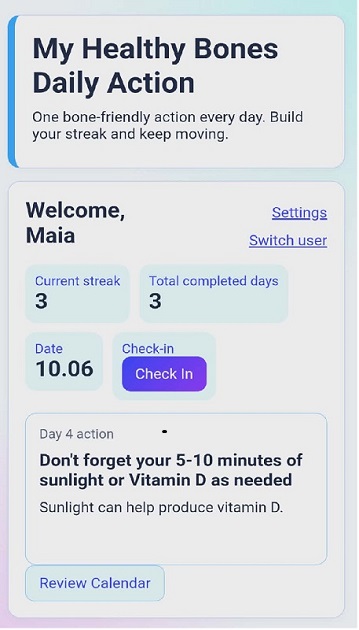
“My Healthy Bones Daily App” Action
One simple action at a time every day to build the habit of focusing on your bones/muscles one step at a time.
Together, we've got this!


*
Installation instructions: My Healthy Bones Daily Action is a Progressive Web App or PWA and is designed to be installed on your phone, tablet or computer.
Mobile Devices:
Android (Chrome): Tap the three-dot menu in the top-right corner of Chrome and select "Install app" or "Add to Home Screen".
iOS (Safari): Tap the Share button (the square with an arrow pointing up) at the bottom of the screen. Scroll down and select "Add to Home Screen".
Desktop Computers (Windows & macOS)
Chrome or Edge: Look for the Install icon on the right side of the URL bar (a monitor with a down arrow). Alternatively, click the three-dot menu in the browser and select "Install My Healthy Bones Daily Action".
macOS (Safari): Click File in the top menu bar and select "Add to Dock".